動機
先日kotaronくんが学校の宿題で歴史に勉強をしている所をみていたら、ふと?、歴史とプログラミングで何かできないかな?という興味が湧いてきました。算数や美術、音楽とプログラミングは簡単に結びつくけど、歴史って結びつけづらいなぁと。逆にやる気が湧いてきたわけです!
教科書を拝借してペラペラめくってみたら💡💡💡速攻ネタ発見!そうだ!プログラミングで年表を表示しよう!
先日、木曜日クラスで外部テキストに記述されたデータ(Pokemon!)をプログラミングに取り込む授業をしたので、同じように歴史の年表を記述した外部ファイルを取り込むと、年表が表示されるプログラムを作ることにしました。
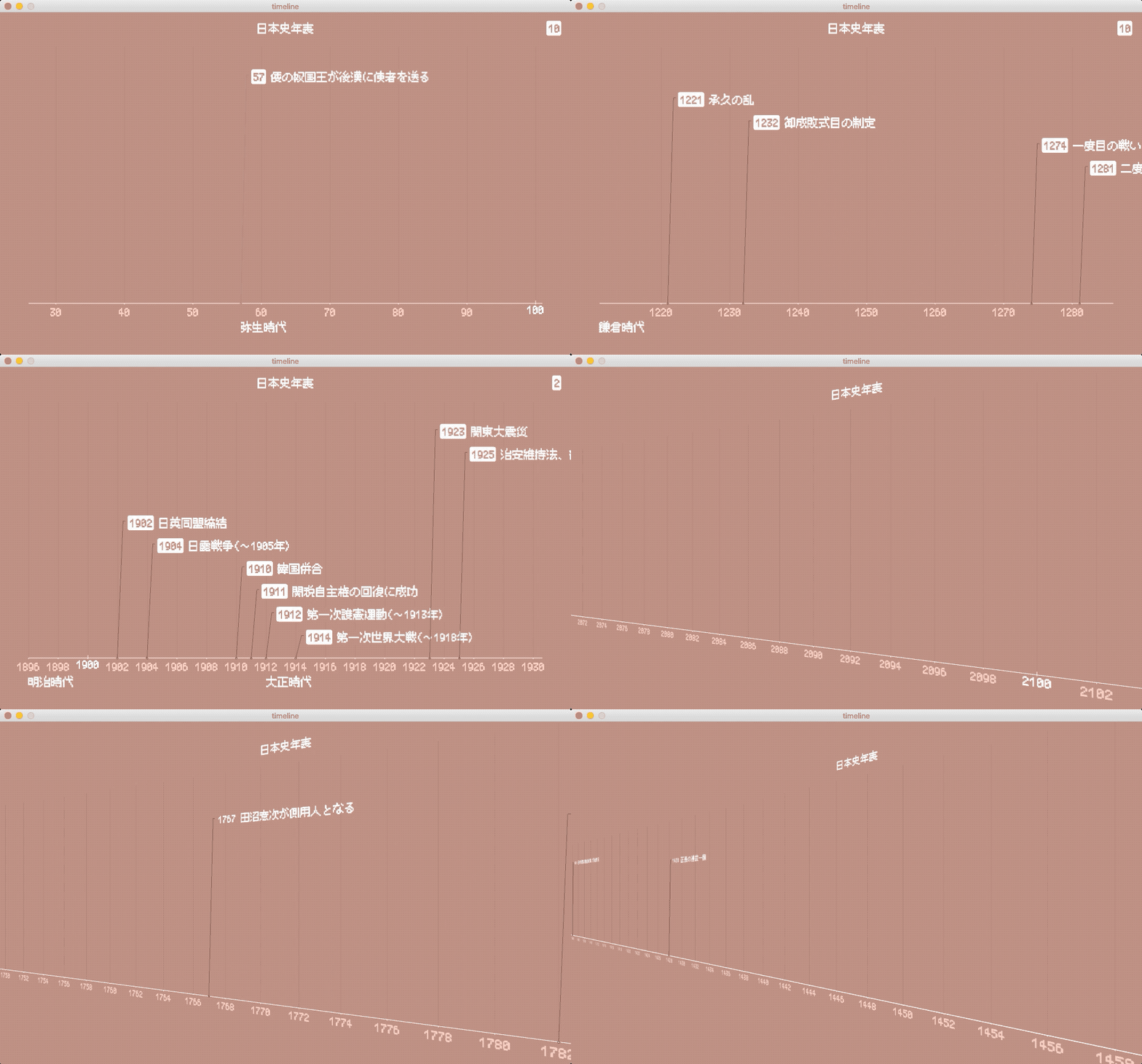
概要案
- 外部ファイルに、年号、出来事、時代をCSV形式で記述
- プログラムで取り込みリストに格納
- 軸線やメモリを描画
- 画面下部に年号を描画
- メイン部分に出来事を描画
ソースコード
fontSize = 10

enable3D = False

paddingTop = 50
paddingRight = 50
paddingBottom = 100
paddingLeft = 50

dotPerYear = 5

gridWidth = dotPerYear * 20
gridHeight = 460 # setupで画面サイズから再計算

yearStart = 1900
yearPre = None
timeline = None

level = 0
LEVEL_MAX = 10

COLOR_BACKGROUND = color(191, 140, 129)
COLOR_BACKGROUND_ALPHA = color(191, 140, 129, 180)
COLOR_TEXT = color(255)
COLOR_SUB_LIGHT = color(255, 206, 192)
COLOR_SUB_DARK = color(114, 83, 77)

def setFont(n = 1):
    global fontSize
    if n == 1:
        fontSize = 20
        font = createFont(u"JFドットM+10 Regular", fontSize, False)
    elif n == 2:
        fontSize = 14
        font = createFont(u"JFドット東雲ゴシック14 Regular", fontSize, False)
    textFont(font)

def bubbleText(t, x, y, align=LEFT):
    textAlign(align)
    textSize(fontSize)
    noStroke()
    if enable3D:
        fill(COLOR_TEXT)
    else:
        fill(COLOR_TEXT)
        if align == LEFT:
            rect(x - 4, y - fontSize, textWidth(t) + 6, fontSize * 1.3, 4) # 職人芸で微調整
        elif align == RIGHT:
            rect(x - 4 - textWidth(t), y - fontSize, textWidth(t) + 6, fontSize * 1.3, 4) # 職人芸で微調整
        else:
            pass
        fill(COLOR_BACKGROUND)
    text(t, x, y)

def setEvent(e, y, isText):
    global level, nowEra, yearPre
    eYear = int(e[0])
    eText = e[1]
    x = paddingLeft + (eYear - yearStart) * dotPerYear

    # 左端の時代が見えない場合の補助
    if len(e[2]) > 0 and x < paddingLeft:
        nowEra = e[2]

    if x >= paddingLeft and x <= width - paddingRight:

        stroke(114, 83, 77)
        fill(COLOR_TEXT)
        noFill()

        lineHeight = fontSize * level * 2

        if isText:
            # 時代名
            textAlign(LEFT)
            textSize(fontSize)
            text(e[2], x, y + fontSize * 2.4)

            # 左端の時代が見えない場合の補助を表示する場所がない場合はナシにする
            if len(e[2]) > 0 and x < paddingLeft + textWidth(nowEra):
                nowEra = ""

            # 年
            tX = x + 10 + 4 + 8
            tY = y - lineHeight + fontSize / 2
            bubbleText(e[0], tX, tY)

            # 出来事名
            tX += textWidth(e[0]) + fontSize / 2
            if enable3D == False:
                fill(COLOR_BACKGROUND_ALPHA)
                rect(tX, tY - fontSize, textWidth(eText), fontSize * 1.3)
            textAlign(LEFT)
            textSize(fontSize)
            fill(COLOR_TEXT)
            text(eText, tX, tY)

        else:
            # 引出線
            if eYear != yearPre: # 同年の出来事がある場合は描画しない
                ellipse(x, y, 3, 3)
                line(x, y, x + 10, y - lineHeight)
                line(x + 10, y - lineHeight, x + 10 + 4, y - lineHeight)

    yearPre = eYear
    level -= 1
    if level < 1 :
        level = LEVEL_MAX


# ===================================================

def setup():
    size(1000, 600, P3D)

    global timeline, gridHeight
    gridHeight = height - paddingTop - paddingBottom
    timeline = loadStrings("timeline.txt")
    setFont(1)

def draw():
    global level, yearStart, dotPerYear, gridWidth
    background(COLOR_BACKGROUND)

    # カメラ
    if enable3D:
        x = mouseX
        if mouseX > width / 7 * 6:
            x = width / 7 * 6
        if mouseX < width / 7:
            x = width / 7
        camera(x, height/2, (height/2) / tan(PI/6), width/2, height/2, 0, 0, 1, 0);
    else:
        camera(width/2.0, height/2.0, (height/2.0) / tan(PI*30.0 / 180.0), width/2.0, height/2.0, 0, 0, 1, 0)

    # X軸線
    fill(COLOR_TEXT)
    stroke(COLOR_TEXT)
    x1 = paddingLeft
    y1 = paddingTop + gridHeight + 10
    x2 = width - paddingRight
    y2 = paddingTop + gridHeight + 10
    line(x1, y1, x2, y2)

    # 刻み線
    textAlign(CENTER)
    textSize(fontSize)
    xStart = paddingLeft + (ceil(yearStart / gridWidth) * gridWidth - yearStart) * dotPerYear
    count = yearStart + (ceil(yearStart / gridWidth) * gridWidth -yearStart)
    for i in range(xStart, width - paddingRight + 1, gridWidth):
        if i >= x1 and i <= x2:
            stroke(175, 128, 118)
            line(i, y1 - 1, i, y1 - gridHeight)
            stroke(255)
            if count % 100 == 0:
                line(i, y1 + 2, i, y1 - 5)
                fill(COLOR_TEXT)
                text(count, i, y1 + 2 + fontSize * 0.8)
            else:
                line(i, y1, i, y1 + 2)
                fill(255, 206, 192)
                text(count, i, y1 + 2 + fontSize)
        count += (gridWidth / dotPerYear)

    # 罫線と被るので手前に
    translate(0, 0, 1)

    # 出来事(引出線)
    level = LEVEL_MAX
    for tl in timeline:
        setEvent(tl.split(","), y1, False)

    # 出来事(文字)
    level = LEVEL_MAX
    for tl in timeline:
        setEvent(tl.split(","), y1, True)

    # 時代補助
    if len(nowEra) > 0:
        textAlign(LEFT)
        fill(COLOR_TEXT)
        text(nowEra, paddingLeft, y1 + fontSize * 2.4)

    # タイトル
    fill(COLOR_TEXT)
    textSize(fontSize)
    textAlign(CENTER)
    text(u"日本史年表", width / 2, paddingTop / 2 + fontSize / 2)

    # 縮尺表示
    bubbleText(str(gridWidth / dotPerYear), width - 20, paddingTop / 2 + fontSize / 2, RIGHT)

    # キー操作
    if keyPressed == False:
        return


    # フォント変更
    if key == "1":
        setFont(1)
    elif key == "2":
        setFont(2)

    # 左右スライド
    if keyCode == LEFT:
        # yearStart -= 1
        yearStart -= 60 / dotPerYear
    if keyCode == RIGHT:
        # yearStart += 1
        yearStart += 60 / dotPerYear

    # 縮尺変更
    if keyCode == UP or keyCode == DOWN:

        if frameCount % 5 != 0:
            return

        if keyCode == UP:
            dotPerYear +=1
        if keyCode == DOWN:
            dotPerYear -=1

        # 縮尺上限下限チェック
        if dotPerYear > 60:
            dotPerYear = 60
        if dotPerYear < 2:
            dotPerYear = 2

        # 縮尺に応じてgridWidth再計算
        if dotPerYear < 10:
            gridWidth = dotPerYear * 20
        elif dotPerYear < 15:
            gridWidth = dotPerYear * 10
        elif dotPerYear < 24:
            gridWidth = dotPerYear * 5
        elif dotPerYear < 46:
            gridWidth = dotPerYear * 2
        else:
            gridWidth = dotPerYear * 1

def mousePressed():
    global enable3D, paddingRight, paddingLeft
    enable3D = not(enable3D)
    if enable3D:
        paddingRight = -1450
        paddingLeft = -1450
    else:
        paddingRight = 50
        paddingLeft = 50
す、すげえ…!(いまさらだけど見た)
ありがと!見てくれた人がいたとは!そして、半年以上遅れての返信である…ゴメン🙇♂️